Lutron seeTouch QS Dual Wallstation
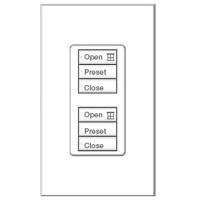
Lutron seeTouch QS Insert Version - Dual Wallstation 2 Sets of 3 Buttons - Illuminated Buttons
|

| | Lutron seeTouch QS Dual Wallstation 2 Sets of 3-Buttons Features |  | Lutron seeTouch QS Dual Wallstation Functions as two independently programmable controllers: a 3-button (top keypad group) and a 3-button (bottom keypad group). Can control two lighting zones, two shade zones, or one of each | | Can be used to control 2 different groups of light scenes using 3 Scenes | | Can be used to control 2 different groups of shades using Open, Preset, Close | | Use with Lutron Grafik Eye QS light scene and shading controllers | | Power up to 3 seeTouch QS wallstations directly off 1 Lutron Grafik Eye QS unit. To power 12 additional Wallstations use Auxiliary Power Supply - TU240-15DC-9-BL | | Backlit buttons with optional engraving make it easy to find and operate the Wallstation in low light conditions | | Optional button engraving is angled up to the eye for easy reading | | Insert Frame version | | | Light Control Features | | Top three-button has the functions of a 3 Button Wallstation. This includes recall preset light levels for scenes (1 - 3; 5 - 7; 9 - 11; or 13 - 15) | | Bottom three-button has the functions of a 3 Button Wallstation. This includes recall preset light levels for scenes (1 - 3; 5 - 7; 9 - 11; or 13 - 15) | | | Contact Closure Features | | Receives up to two contact closure inputs via a connector on the back of the seeTouch QS wallstation | | When keypad is programmed as scene or zone toggle, input 1 closure will perform the top button (top group) action, and input 2 closure will perform the bottom button (top group) action | | When keypad is programmed as a partition control, input 1 controls the partition programmed to the top button (top group) (closure = close partition; opening = open partition) and input 2 controls the partition programmed to the bottom button (top group) (closure = close partition; opening = open partition) | | | Sivoia QS Shade Control Features | | Bottom three-button used to select Open, Pause, Close shades independently | | Top three-button used to select Open, Pause, Close shades independently |
| | Lutron seeTouch QS Dual Wallstation 2 Sets of 3-Buttons Technical Detail | | Back Box Type | Fits Lutron back box 241218 - 63mm deep | Diamensions
(H, W, D) mm | 70 x 116 x 21 | | Order Code | Lutron seeTouch QSWS2-3RLDI-(Colour Ref) |
| | Package | | Unit | 1 | | Back Box | 1 Lutron 241218 (50 x 100 x 63mm) | | Fixing | 2 screws included | | Warranty | 12 Months | | | | | VAT | UK VAT will be added to the total price at Checkout | | Delivery Time | Stock Item | | Delivery | Free Delivery on Orders Over £350.00 |
| | Lutron seeTouch QS Dual Wallstation 2 Sets of 3-Buttons Options | | Standard model wallstations are white and come unengraved | | Items marked with * may take up to 1 - 2 week delivery time | | All other colours are made to order - Delivery can take up to 2 - 3 weeks | |  39 colours available to coordinate with any décor 39 colours available to coordinate with any décor | | Available with button engraving that can be customized for lighting and/or shade applications | | Print and complete the engraving sheet then contact for instructions | | White matt plastic finish - Standard model | | Black matt plastic finish | | Satin Nickel Metal Finish * | | Bright Brass Metal Finish* | | Satin Brass Metal Finish * | | Bright Chrome Metal Finish* | | Satin Chrome Metal Finish * | | Antique Brass Metal Finish * | | Antique Bronze Metal Finish* | | Gold Plated Metal Finish* | | Please select colour and finish option from list |
|



 £30.00 EU delivery